
Description
All products on this site are specialized items subject to market price fluctuations.
Please refer to the customer service quotation for the actual price, as the listed price may not be definitive.
Before placing an order, please confirm details such as the model, product specifications, and pricing with customer service.
Please contact customer service for inquiries regarding these products.
PP881 3BSE092978R1 – Alternative Names:
HMI PP881 3BSE092978R1
PP881 3BSE092978R1 Operator Unit
Control Panel PP881 3BSE092978R1
As a core standard HMI product in the ABB Panel 800 series, the PP881 3BSE092978R1 is a 10.1-inch industrial-grade TFT touchscreen designed specifically for human-machine interaction, process monitoring, and equipment control in industrial automation environments. Built upon ABB’s proven industrial automation technology architecture, the device features a high-performance display and touch unit and supports multi-protocol communication. It is characterized by high stability, strong adaptability, and ease of maintenance, making it widely compatible with DCS control systems, PLC automation production lines, and various industrial process control applications. This article provides a comprehensive overview from an engineering perspective, covering its operating principles, standard operating procedures, usage precautions, core application areas, and industrial value.
I. Core Operating Principles of the Device
The core operating logic of the ABB PP881 3BSE092978R1 industrial touchscreen is a closed-loop control mechanism integrating data interaction, visual data processing, and touch command output. It serves as the “human-machine interaction hub” for industrial automation systems, with an overall workflow structured into four core layers that fully meet the real-time control requirements of industrial sites. Hardware Acquisition and Communication Layer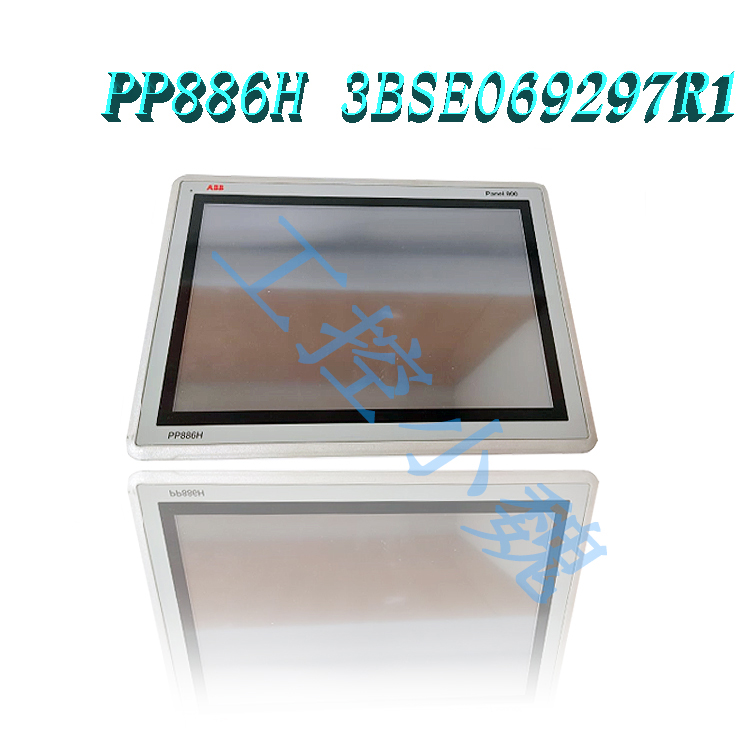
The device features an industrial-grade multi-core processing unit, a multi-protocol communication module, a high-definition TFT/LED display, and a capacitive touch-sensing unit. Supporting mainstream industrial communication protocols, it establishes stable data links with systems such as the ABB System 800xA DCS, various PLCs, sensors, and actuators. It captures comprehensive industrial data—including temperature, pressure, flow rate, rotational speed, operating status, and fault codes—in real-time while simultaneously receiving command signals from the control system.
Data Parsing and Processing Layer
Equipped with a dedicated embedded industrial system and ABB Panel Builder professional configuration software, the unit filters, converts, and categorizes raw industrial data, discarding invalid data caused by field interference. It transforms complex low-level device data and control logic into standardized, visual interfaces—such as graphics, curves, numerical displays, and alarm pop-ups—thereby resolving issues related to the obscurity and difficulty of interpreting raw industrial data.
Human-Machine Interaction and Execution Layer
Operators issue commands via the 10.1-inch high-definition touchscreen, performing actions such as parameter modification, equipment start/stop, mode switching, valve adjustment, and recipe selection. The touch unit captures touch points and commands in real-time; following system verification and logic validation, these are converted into standard control signals and transmitted to the main control system. The main control system then drives field equipment to execute the corresponding actions, enabling manual intervention and control.
Feedback and Early Warning Layer
The device receives real-time execution feedback from field equipment and dynamically updates operating parameters and status displays. Upon detecting issues such as threshold violations, equipment faults, or process anomalies, it immediately triggers audiovisual alarms, pop-up notifications, and data logging functions. It simultaneously stores operation logs and fault information, establishing a complete “acquisition-display-control-feedback-warning” closed-loop workflow that ensures industrial processes remain controllable and traceable.
II. Standardized Operating Procedures
Aligned with ABB’s standardized O&M specifications for industrial equipment, the operation of the PP881 3BSE092978R1 touchscreen is structured into three main modules: initial configuration, routine on-site operation, and subsequent data maintenance. The workflow is streamlined and highly standardized, enabling industrial operators to quickly master its use.
1. Initial Configuration and Commissioning
Before the equipment is officially put into service, ABB Panel Builder configuration software must be installed on a PC. Using the software’s built-in industrial template libraries, graphical controls, and process function libraries, operators complete configuration tasks such as interface design, parameter binding, communication setup, alarm logic definition, and access permission settings. The software runs on Windows and features an operating logic similar to standard office applications; it supports multi-language configuration and vector graphics editing, allowing for the rapid creation of human-machine interfaces (HMIs) tailored to various process scenarios. Once configured, the program is downloaded to the PP881 3BSE092978R1 touchscreen via an Ethernet cable or serial port. This step establishes communication between the device and the main control system and includes I/O point testing and screen calibration to ensure real-time, accurate data transmission without latency or errors.
2. Routine On-Site Operations
After the device completes its power-on self-test, it automatically loads the preset main process interface, allowing operators to perform routine maintenance and operational tasks via the touchscreen. 1. Status Monitoring: Real-time viewing of operating parameters, start/stop status, and process progress for production lines, power equipment, and process piping via main and sub-interfaces; parameter trends can be analyzed using trend curves. 2. Parameter Control: Modification of core parameters—such as process temperature, pressure, operating speed, and production recipes—via touch controls within authorized limits; supports fine-tuning, batch loading, and mode switching. 3. Equipment Operation: Direct control via interface buttons to perform on-site actions such as starting/stopping individual units or production lines, toggling valves, and adjusting variable frequency drives. 4. Alarm Handling: Upon alarm activation, clicking the pop-up notification allows users to view the fault cause, location, and recommended solutions; supports alarm acknowledgment and fault resetting.
3. Data Maintenance and System Operation
The PP881 3BSE092978R1 supports the automatic storage of production data, operation logs, and fault records. Operators can retrieve historical data and export reports via the backend interface for production statistics, fault tracing, and process optimization. It also supports custom configuration of screen brightness, touch sensitivity, system time, and communication parameters, allowing for the optimization of equipment operation based on ambient lighting and environmental conditions to ensure a positive user experience and operational stability. The device features hierarchical access control, allowing for the assignment of distinct permission levels (e.g., operator, engineer, administrator) to prevent accidental or unauthorized operations.
III. Key Precautions for Equipment Use
As a precision industrial control terminal, the PP881 3BSE092978R1 touchscreen has strict requirements regarding installation environments, operating procedures, and maintenance. Strictly adhering to the following precautions can effectively extend the equipment’s service life and prevent malfunctions or safety hazards.
1. Installation and Environmental Compatibility
The device must be installed in an industrial cabinet or control panel that is dry, well-ventilated, and free from highly corrosive gases and severe vibrations; avoid direct exposure to harsh environments characterized by heavy dust, water mist, or oil contamination. The device operates on a standard industrial power supply; stable voltage must be ensured, and operation under over-voltage or under-voltage conditions is strictly prohibited. Voltage stabilization devices and grounding protection must be installed to prevent hardware damage caused by static electricity or voltage fluctuations. Additionally, the device must be kept away from sources of strong electromagnetic interference—such as variable frequency drives (VFDs) and high-power motors—to prevent electromagnetic radiation from affecting data transmission accuracy and touch sensitivity.
2. Guidelines for Daily Operation
Operate the screen using only a light touch of the finger; the use of sharp or hard objects to tap or scratch the screen is strictly prohibited to avoid damaging the touch layer or cracking the screen. Unauthorized modification of core system configuration parameters, communication addresses, or low-level device settings is forbidden, and access to the engineer-level interface is restricted to authorized personnel. Do not cut off power directly while the device is running; follow the standard industrial shutdown procedure—exiting the operation interface and closing the program—before disconnecting the power to prevent program loss, data corruption, or system crashes. In the event of an alarm or fault, first troubleshoot the equipment on-site; blindly resetting alarms or forcing the equipment to operate is prohibited.
3. Guidelines for Maintenance and Troubleshooting
For daily cleaning, gently wipe the screen surface with a soft, lint-free cloth; do not use alcohol or strong alkaline cleaners directly on the screen, as these can corrode the screen coating. Regularly inspect communication lines and power supply interfaces for issues such as loose connections, aging, or oxidation to ensure stable data transmission and power supply. If the device is to be shut down for an extended period, disconnect the power and take appropriate measures to protect against dust and moisture. If faults such as screen lag, failure to refresh data, touch unresponsiveness, or communication loss occur, first power-cycle the device to troubleshoot basic issues; if the fault persists, contact a professional ABB engineer for repair. Unauthorized disassembly of the device or hardware components is prohibited, as this may void the warranty and exacerbate the fault.
IV. Core Application Areas
Leveraging high stability, strong compatibility, and industrial-grade protection, the PP881 (3BSE092978R1) touchscreen is suitable for diverse scenarios across both process and discrete manufacturing industries. It serves as a standardized core Human-Machine Interface (HMI) terminal for industrial automation systems. Its core application areas include:
1. Power and Energy Industry
Widely used in thermal power, hydropower, renewable energy plants, and substations. It integrates with turbine control systems, generator units, and grid voltage stabilization systems to monitor critical parameters such as unit speed, temperature, pressure, and grid load. It enables the control of power generation equipment (start/stop/regulation), grid status monitoring, and fault early warning, ensuring the stable operation of the power system.
2. Petrochemical and Coal Chemical Industries
Suitable for high-risk, continuous production environments such as chemical reactors, distillation units, oil and gas pipelines, and flare gas recovery systems. It monitors process parameters—including flow rate, temperature, pressure, and liquid level—in real-time, precisely regulates production processes, and provides immediate alerts for critical faults like leaks, over-temperature, and over-pressure conditions. It meets the chemical industry’s requirements for continuous, high-precision, and highly safe production management.
3. Municipal and Environmental Protection Industries
Applied in municipal environmental projects such as wastewater treatment plants, water purification plants, flue gas treatment facilities, and waste-to-energy incineration plants. It monitors the operating status of water pumps, fans, chemical dosing systems, and filtration equipment, as well as water quality and exhaust emission indicators, enabling automated control of environmental equipment and real-time traceability of emission data.
4. High-end Discrete Manufacturing
Suitable for automotive manufacturing, electronic equipment manufacturing, precision machining, and food/pharmaceutical production lines. It is used for status monitoring, parameter adjustment, and production progress management across automated assembly lines, robotic workstations, and assembly equipment, supporting flexible and standardized smart manufacturing scenarios. 5. General Industrial Process Control
It can be paired with various general industrial equipment—such as industrial furnaces and kilns, HVAC systems, air compressor stations, and pump stations—to serve as a local operation terminal. It enables on-site equipment monitoring, manual intervention, and status traceability, meeting the human-machine interaction requirements of small- and medium-sized automation control systems.
V. Industrial Application Value and Role
Within industrial automation control systems, the ABB PP881 3BSE092978R1 touchscreen is not merely a display terminal; it acts as a core hub bridging manual operation and automated equipment performance. It plays a pivotal role in industrial production management, efficiency enhancement, safety assurance, and cost control.
First, it enables visual management of the production process and lowers the operational threshold. Utilizing a high-definition visual interface, the device transforms complex low-level industrial data and process logic into intuitive graphics, curves, and numerical values, replacing traditional, cumbersome methods of instrument monitoring and manual record-keeping. Operators can quickly grasp equipment status and process conditions without needing to master specialized low-level control logic, thereby significantly reducing operational complexity and improving human-machine interaction efficiency.
Second, it enhances production precision and the level of automation, driving quality improvements and efficiency gains. The device accurately collects and synchronously feeds back process parameters in real time; it supports fine-tuned parameter adjustments and the use of standardized recipes, effectively minimizing human error and ensuring process stability and product consistency. Furthermore, its real-time monitoring and automatic warning functions help reduce equipment idling and unplanned downtime, substantially boosting the overall operational efficiency and capacity utilization of the production line.
Third, it fortifies the defense against industrial safety hazards and reduces safety risks. For high-risk sectors such as the chemical and power industries, the device provides continuous, 24-hour monitoring of process anomalies and equipment faults. It issues early warnings for safety hazards and rapidly pinpoints fault locations, assisting O&M personnel in quick resolution to prevent safety accidents caused by overheating, overpressure, or equipment failure. Additionally, it logs operational and fault data throughout the process, ensuring traceability and enabling post-incident analysis in compliance with industrial safety and production control standards.
Fourth, it streamlines O&M workflows and reduces production and operational costs. Featuring ABB’s standardized configuration system—complete with extensive templates and user-friendly configuration tools—the device significantly shortens project commissioning cycles. Its robust hardware, low failure rate, and broad compatibility allow it to integrate with the vast majority of industrial automation systems, thereby minimizing costs associated with replacing or adapting terminal equipment. Furthermore, features such as hierarchical access control and automatic data logging simplify daily maintenance, troubleshooting, and production statistics, effectively lowering manual O&M expenses.
Fifth, it meets the demands of smart manufacturing upgrades and offers enhanced system scalability. As a standardized terminal in the Panel 800 series, the PP881 (3BSE092978R1) supports multi-protocol communication and system expansion. It is suitable for both retrofitting legacy automation equipment and establishing new smart production lines, providing stable human-machine interface (HMI) support for factory digitalization and intelligent upgrades, while helping enterprises achieve refined, digital production management.
VI. Conclusion
The ABB Panel 800 PP881 (3BSE092978R1) 10.1-inch industrial HMI is perfectly suited for a wide range of automation scenarios in both process and discrete manufacturing, thanks to its mature industrial-grade hardware architecture, stable data interaction capabilities, standardized operating system, and rigorous industrial compatibility. With its clear operational logic, user-friendly interface, and reliable performance, it addresses the pain points of traditional industrial human-machine interaction—such as cumbersome procedures, non-intuitive data, and difficult management and control—while providing core support for safe, precise, efficient, and digital industrial management. It serves as an indispensable, standardized core terminal in industrial automation control systems and a key component of ABB’s industrial automation solutions.
Model recommendation:
PP865A
PP865A 3BSE042236R2
PP875
PP875 3BSE092977R1
PP877
PP877 3BSE069272R2
PP881
PP881 3BSE092978R1
PP886H
PP886H 3BSE069297R1
PP886 3BSE092980R1
PP825
PP825 3BSE042240R1
PP825A
PP825A 3BSE042240R3
PP836
PP836 3BSE042237R1
PP836A
PP836A 3BSE042237R2
PP845
more……

-300x300.jpg)
admin –
II. Screen Hardware Specifications
Display: 10.1-inch TFT LED backlit color screen, 16:10 widescreen
Resolution: 1280 × 800, 16 million true colors, 170° viewing angle
Brightness: 500 cd/m², adjustable backlight, strong light visible from the cabinet
Touch Type: Resistive industrial touch, resistant to oil, dust, and gloves
Physical Buttons: 6 customizable function buttons on the side of the unit (screen switching, alarm confirmation, emergency stop linkage, etc.)
III. Core Hardware Configuration
Processor: ARM industrial embedded processor
Memory: 128MB DDR2 RAM
Storage: 80MB built-in Flash + Micro SDHC memory card slot (engineering backup, data export)
Power Consumption: 21.6W
Power Supply: DC 24V (18~32VDC allowed) Wide Voltage
IV. Dimensions and Installation
Overall Dimensions: 292 mm (W) × 194 mm (H) × 52 mm (D)
Rack Opening Dimensions: 275 mm × 177 mm
Installation Method: Recessed panel mounting, supports VESA75 wall mount bracket
Net Weight: 1.65 kg
V. Full Interface Configuration (Rear)
Ethernet (2 independent RJ45 10/100M)
Port 1: Connects to AC800M/800xA controller via MMS protocol
Port 2: Host SCADA, Modbus TCP, Profinet IO
Serial Port Channels
COM1: RS232 (program download, serial peripherals)
COM2: RS422/RS485 (Modbus RTU, third-party instruments)
USB 2.0 Host ×2
U Disk backup engineering, alarm/trend record export, external mouse and keyboard connection
SD card slot, 24V power terminal
VI. Protection and Environmental Parameters
Front panel protection: IP65 / NEMA 4X (waterproof and dustproof, suitable for workshops and power plant cabinets)
Rear interface area: IP20 (inside the rack)
Operating temperature: -10℃ ~ +60℃
Storage temperature: -20℃ ~ +70℃
Humidity: 5%~85% RH, non-condensing
Vibration resistance: 5~500Hz, 0.7g, meeting the industrial conditions of power plants, water pumps, and compressors
Certifications: CE, UL 61010, DNV marine certification
VII. Supported Communication Protocols (Multi-brand compatible)
ABB native protocol
MMS (AC800M/800xA), AF100, Freelance, Modbus TCP/RTU
Third-party mainstream drivers
Profinet IO, EtherNet/IP, Modbus RTU, CANopen, GE Fanuc, Rockwell Automation, Siemens S7, and various inverter/instrument bus protocols, supporting simultaneous multi-channel connection to controllers from different brands.
VIII. Core Operation Functions
Process flow monitoring, manual parameter setting, equipment start/stop operation
Real-time alarm window + historical alarm storage (with timestamp and fault level)
Analog quantity trend curves, batch recipe management
User hierarchical permission management (operator/administrator/engineer)
Data export to USB flash drive, remote alarm email push
Multi-language switching, system real-time clock (RTC)
IX. Supporting Configuration Software
Panel Builder 800 (Windows platform)
Drag-and-drop screen configuration, built-in industrial library (valves, motors, instruments)
Offline simulation, download project to… PP881
Supports project backup, firmware upgrade, and touchscreen diagnostics
X. Typical Application Scenarios
Chemical/Hydropower/Gas Power Plant DCS Local Operation Station (with UNITROL excitation and gas turbine control system)
Water Treatment, Oil & Gas, Chemical Process Control
Marine Power Plant, Metallurgical Rolling Mill, Air Compressor/Refrigeration Unit PLC System
ABB AC500, AC800M Small and Medium-Sized Automation Cabinet
XI. Spare Parts Replacement Notes
Panel800 Series Size Differentiation:
PP875 (7″) / PP881 (10.1″) / PP883 (12.1″) / PP886 (15.4″), screen sizes are not interchangeable
The part number suffix R1 indicates the standard hardware version; 3BSE092978R1 is preferred for replacement.
After replacing with a new unit, the complete project screen and variable configuration must be downloaded via Panel Builder.
https://www.weikunfadacai1.com/product/rh924uq-foxboro/
https://www.weikunfadacai1.com/product/3bhe030579r0003-controller-abb/
https://www.weikunfadacai1.com/product/unitrol-1020-controller-abb/
https://www.weikunfadacai1.com/product/abb-unitrol-1020-uns0119a-zv1-3bhe030579r0003/
https://www.weikunfadacai1.com/product/unitrol-1020-3bhe030579r0003/
https://www.weikunfadacai1.com/product/abb-unitrol-1020-3bhe030579r0003/
https://www.weikunfadacai1.com/product/362a1052p004-flame-detector-honeywell-362a1052p004/
https://www.weikunfadacai1.com/product/abb-pp881-3bse092978r1/
admin –
Product Advantages
Native, deep integration with ABB DCS: Native optimization for System 800xA and Freelance allows direct tag importation without manual variable mapping; alarms, time synchronization, and event logging remain consistent with the DCS, significantly reducing configuration workload compared to third-party HMIs.
Industrial-grade ruggedness and environmental adaptability: Features a cast-aluminum housing and an IP65-rated front panel (dustproof and waterproof); operates in a wide temperature range (-10°C to +60°C) and withstands vibration; holds marine certifications, making it suitable for power plants, chemical facilities, and marine vessels. Equipped with a resistive touchscreen that allows operation while wearing thick gloves, making it ideal for environments with oil and dust.
Efficient configuration: Uses the accompanying Panel Builder software, featuring extensive pre-built graphics libraries and control templates, as well as distortion-free scalable vector graphics; tag counts can be licensed as needed, keeping project costs controllable.
Dual-port redundant communication: Two independent, shielded Ethernet ports enable network redundancy—automatically switching if one line fails—thereby enhancing operational reliability; this is a standard solution for DCS field operator stations.
Compact, all-in-one design: Designed for panel-mount installation with a shallow mounting depth; includes an integrated SSD, eliminating the need for additional storage cards to save projects and historical data.
https://www.weikunfadacai1.com/product/abb-pp881-3bse092978r1/
admin –
Operate the screen using only a light touch of the finger; the use of sharp or hard objects to tap or scratch the screen is strictly prohibited to avoid damaging the touch layer or cracking the screen. Unauthorized modification of core system configuration parameters, communication addresses, or low-level device settings is forbidden, and access to the engineer-level interface is restricted to authorized personnel. Do not cut off power directly while the device is running; follow the standard industrial shutdown procedure—exiting the operation interface and closing the program—before disconnecting the power to prevent program loss, data corruption, or system crashes. In the event of an alarm or fault, first troubleshoot the equipment on-site; blindly resetting alarms or forcing the equipment to operate is prohibited.